
Filecamp Release Notes
If you're curious about what's new in Filecamp — and what's changed — you're in the right place.
Release
We hope the updates you'll read below make it easier for your team to share files and collaborate with your clients and partners. ✨
July 4, 2026 expected
What’s new
- We’ve improved the UI so you can now keep the Infobar open while browsing through files.
Tip: You can still open and close the Infobar by pressing the i key.
June 27, 2026
What’s new
- We have improved Search, so wildcard matching is now built in, making it easier to find the right files and folders without adding wildcard characters like * at the end of a search term.
Bug fixes
- Fixed a timeout issue that could occur when changing labels on more than 1,000 items at once.
June 16, 2026
Bug fixes
- Files are once again sorted by upload date.
- Fixed an issue where HTML code was visible in emails sent from Filecamp.
- Improved support for file uploads larger than 10 GB.
June 14, 2026
What’s new
- Improved Search with advanced filters and recent searches.
- Added a Reset to default option to the layout selector, so users can quickly return to the folder’s default layout settings.
- Refined the UI language and translations across all 16 supported languages.
Bug fixes
- Fixed an issue where the user list did not update after users were deleted.
June 6, 2026
What’s new
- A persistent “logged in as another user” notice is now shown when you are viewing an account as another user.
- Single files downloaded from the bulk action bar now download directly instead of as a ZIP file.
- Long folder and file descriptions are now better supported in the infobar.
- The “.link” extension is now hidden from link file names.
- A new tooltip in the share modals now explains the different link types.
Bug fixes
- Fixed an issue with creating vanity URLs for shared links.
- Shared links now continue to work when the user who created them is deleted.
- Fixed an issue where email invites could direct new users to a subfolder instead of their home folder on first login.
- Fixed an issue where log search did not include files inside folder-level uploads and downloads.
- Activities from deleted users are now listed in the Log as “Deleted user” instead of just “-”.
- Fixed an issue where custom thumbnails on link files could stop displaying after copying.
June 1, 2026
Bug fixes
- Fixed an issue that could prevent newly uploaded files from downloading and cause them to be missing from shared links on some very large customer sites.
- Fixed an issue where special hidden characters in file names could cause download problems.
- Fixed a timeout issue when downloading collections or multiple files.
- Started a cleanup of old JPG and PNG preview files, which will free up storage in some accounts over the next few months.
May 23, 2026
Bug fixes
- Fixed an issue with navigating through search results.
- Improved how Access Requests can be turned on and off.
- Improved upload handling for large uploads and network disruptions.
- Improved text contrast for secondary colors in Themes.
- Images added to Pages now use the preview version for improved quality
- NPS and review prompts now appear less often after clicking “Not now”.
May 5, 2026
Bug fixes
April 25, 2026
What’s new
- The Templates section has been removed. Notifications and emails sent from Filecamp now support multiple languages. Users can set their preferred language in the My profile section.
- Users can now opt out of all notifications in the My profile section.
- If an upload fails, you can now view a list of failed uploads.
Bug fixes
- Each generated share link now retains the selected link type from when it was created.
- You can now see which parent folders have notifications enabled.
- Improved layout in the Notifications inbox and outbox.
April 18, 2026
What’s new
- Customise your default folder icon with colours at the theme level. Read more.
- Add clickable links to your folder banners. Read more.
- Search is now more precise. Exact phrase matching is enabled by default, with support for AND, OR, and *. Read more.
Bug fixes
- User avatars in emails are no longer distorted in Outlook.
- Emojis 🥳 are now supported in messages and folder sharing.
- You can now upload empty folders to replicate a template folder structure from your local computer.
- Animated GIFs are now supported as folder banners.
- Fixed an issue where white top bar text appeared black in some email clients.
- Improved theme consistency when navigating between folders with different themes.
- Fixed an issue with version uploads.
- Improved handling of curly quotes in search.
- Fixed incorrect “Last login” when copying permissions.
April 12, 2026
What’s new
- You can now set a default folder icon at the theme level. This helps create a more consistent and branded experience by allowing you to define and upload a default icon for folders within each theme. Read more.
- Improved search within folders. We have refined the search UI, making it easier to search within the current folder.
- You can now also search within Collections.
Bug fixes
- Improved bulk user permissions handling.
- The Delete / Backspace keyboard shortcut now also removes items from collections.
- Improved handling of empty folder uploads.
January – March 2026
This release has now been fully rolled out. All customer sites have been successfully migrated to the new version.
What´s new
- Dark and light mode. Users can now choose their preferred viewing mode. Read more.
- Flexible Grid layout. A new layout option designed for larger previews. Ideal for photographers and visual-heavy workflows. Read more.
- New Tags control panel. A dedicated Tags control panel where users can view, manage, and run AI-powered reviews for errors and duplicates in their keywords. Read more.
- Keyboard shortcut help. Press “?” to quickly view all available keyboard shortcuts. Read more.
- Right-click menu in all folders. You can now right-click anywhere in a folder to create new folders and perform other actions.
- WebP image previews. We have replaced the previous Small and Medium JPG/PNG exports with WebP. This modern format provides better quality at smaller file sizes. Read more.
- Hosting migration from GCP to Azure. This is a major backend and server-side change with no visible impact on how Filecamp looks or works. More details will follow. Read more.
- And many more small refinements.
December 6, 2025
Bug fixes
- We’ve fixed an issue that prevented the OR boolean operator from working correctly when used between multiple quoted phrases, improving the reliability of complex search queries.
November 22, 2025
Bug fixes
- Bulk and context-menu actions are now available in Search for users who have access to specific folders only. Their actions still follow the lowest permission across those folders, but search no longer forces them down to a minimal default.
- The login screen now fits the viewport better, without any scrolling or blank space.
- Modal headers now contain very long file and folder names reliably.
- In Search, selecting items no longer hides the search term, which now stays dimly visible.
November 8, 2025
Bug fixes
- Fixed a caching/loading issue when placing markers on large PDF files.
- Fixed an issue where dragging images from HTML folder descriptions could trigger the upload dropzone.
- Drag-select is now disabled over the banner image area.
November 1, 2025
What’s new
- More keyboard shortcuts added! You can now also use Ctrl/Cmd + C, X, and V to copy, cut, and paste files or folders within Filecamp. Read more about keyboard shortcuts.
Bug fixes
- File edits now save when you navigate with the left and right arrow keys.
- Fixed an issue where users could move or copy items into folders with "View only" permissions.
- The Bulk action bar is shown again when you select multiple items from the search results page (when you have access to Home > all folders).
- Dragging the header logo will no longer activate the upload dropzone.
- Fixed an issue where tags starting with uppercase letters were not shown in auto-suggestions.
- Increased image preview limit to 400 MB / 150 MP.
October 25, 2025
What’s new
- Say hello to drag-and-drop! You can now move files and folders around simply by dragging them 🔥
🎥 Watch this short video to see how it works:
October 18, 2025
What’s new
- You can now swipe left or right on mobile to navigate between files in large preview mode.
Bug fixes
- Fixed an issue where some text could appear untranslated when opening the app
- Label changes are now also possible via the Bulk action bar.
October 11, 2025
What’s new
- You can now preview .txt, .rtf, .md, and other text files directly in Filecamp.
Bug fixes
- The Infobar now stays open after saving, making it easier to edit multiple files without reopening it after each save.
- Improved the drag-to-select function, which now supports dragging while scrolling and more.
- Large preview navigation now respects the current folder sort order.
- Fixed an issue that could cause minor problems when editing your own user profile.
- Added more tooltips to icons where they were missing.
October 5, 2025
What’s new
- Right-click is here 🥳 You can now right-click on files and folders to open a context menu for instant access to actions like download, share, move, copy, edit, and more.
- A new print icon has been added on all Pages, making it easier to print Pages with a single click.
- The upload button in the Toolbar now shows a spinner while uploads are in progress and a small checkmark when finished, so you can clearly see the status.
- We’ve added folder access indicators in the folder permissions modal, making it clearer which folders a user already has access to.
Bug fixes
- Fixed an issue where some TIFF images with transparent backgrounds were rendered with black backgrounds in previews.
September 20, 2025
What’s new
- We’ve refreshed and updated large parts of our frontend code, including moving to the latest versions of Angular and PrimeNG🤓 . You won’t notice any major visible changes, but these upgrades help keep Filecamp modern, stable, and ready for what’s next 🚀
Bug fixes
- Commenting from mobile devices is now more reliable and easier to use.
August 17, 2025
Bug fixes
- LINK, WEBLOC, and URL files can now be opened from mobile and other touch devices.
- Fixed an issue where audio file icons were missing in the download modal.
July 26, 2025
Bug fixes
- Fixed an issue where conflicting filenames weren’t being properly overwritten during uploads.
- The “Temporary upload files” and "Image thumbnails and previews" are now correctly cleaned up every hour, freeing up storage space.
July 12, 2025
What’s new
- We’ve made some major improvements to uploads — they now start instantly, and speeds are 3–4 times faster! 🚀
- We’ve expanded our keyboard shortcuts to help you work more efficiently ⌨️
Bug fixes
- Fixed an issue where using the Bulk Action Bar to change Labels could remove labels.
- The "Auto logout after 30 minutes of inactivity" setting is working again.
- Search now does a better job of showing the most relevant results at the top.
- We've blocked right-clicking and dragging on image previews to prevent downloading.
- Banner images are now non-selectable and non-draggable.
- Users with Home (root) access now appear in the folder permission modal.
- Better handling of TIF images with transparent backgrounds.
- Notification settings set on Home (root) folders are now properly inherited by subfolders.
- Uploading a new version of a file now instantly updates the view.
- You’ll now see an error if you try to copy files after reaching your storage limit.
- You can now upload .ico files as favicons for your themes.
June 28, 2025
Bug fixes
- Fixed an issue where some download notifications for bulk ZIP downloads weren't being sent.
- Resolved an issue where old data wasn't being cleared from our search index, which could lead to outdated results.
June 14, 2025
What’s new
- You can now add folders to Collections.
- Our new popular banner feature is now also available on Collections.
- You can now also share folders (View & Download) via the Bulk Action Bar.
- We have re-enabled the NPS pop-up to gather more feedback from our valued customers.
Bug fixes
- Fixed missing thumbnails for TIF images on the search results page.
- Label changes from the search results page now appear faster.
- Fixed an issue where some ZIP download links showed the wrong file size.
- Versions are now displayed in chronological order.
- Improved filename handling when uploading from mobile devices.
- Disabled multiselect for users who do not have bulk action options.
May 25, 2025
What's new
- Improved thumbnail and preview generation, and added a small loading animation
 to show which files are queued for processing.
Bug Fixes
- Fixed a preview glitch with certain .TIF files.
- Optimized some backend code so label changes on files in the search results page take effect faster.
- Added a prompt advising users to switch to a computer when trying to access the admin section from mobile.
- When performing complex operations, like copying or moving large folder structures, we now display a blocking message so you know when it’s finished.
- Restored the advanced settings option for root-level folders.
- Centered the background image on every view that displays a background.
- Downloading small versions of .MOV files works again.
May 13, 2025
What's new
- You can now create folders straight from the Move/Copy and Folder Access dialogs.
- Added sorting options to the column headers (ascending/descending) in the Search results.
- New upload progress bar in the header lets you track uploads even after closing the upload window.
- Layout and sorting tweaks: The user’s chosen layout now overrides the default folder layout globally for the current session. Sorting order is remembered per folder, but only within the current session.
Bug Fixes
- We overhauled how Collections are stored in our database for faster, smoother performance – more improvements are on the way.
- The Terms link now works again on all login pages.
- Improved support for HTML styling in your Custom Terms.
- Search state now resets properly when navigating away from and returning to the Logs or Users views.
- Empty Collections now show an “Empty Collection” message and icon.
- Improved support for older phones and iOS versions.
- Fixed unintended PDF rotation on R keypress and removed the blue outline on keypress.
- We’ve completely rewritten the “Empty Trash” backend code for faster performance and stronger security.
April 19, 2025
What's new
- We’ve added support for Swedish, Japanese, Korean, Russian, Norwegian, and Finnish. Read more.
Bug Fixes
- Fixed a bug that could prevent Advanced Search settings from working correctly.
- After previewing a file from a shared search results page, you’ll now return to the correct scroll position.
April 12, 2025
Bug Fixes
- We added a noindex/disallow directive to all accounts to prevent shared links and similar content from appearing in SERPs.
- After adding items to a Collection or previewing a file (whether from the Files section or search results), you’ll now return to the correct scroll position.
- We fixed an issue that could cause the interface to become unresponsive when entering the Shares section in accounts with many shares.
April 9, 2025
Bug Fixes
- We fixed a caching bug that occasionally caused problems when moving or deleting files and folders.
- We fixed an issue that could cause "File not found" errors when browsing folders in large preview mode.
April 3, 2025
What's new
- We’ve improved performance when scrolling through folders with thousands of items.
Bug Fixes
- You can now also download small versions of .mov files.
- Sort and layout settings are now saved in the user’s cache for a more personalized experience.
March 29, 2025
What's new
- Enhanced Folder Performance: Improved the loading speed for folders, especially those containing over 1,000 items.
- Extended Comment Length: Increased the character limit for comments from 500 to 1,024, allowing for more detailed feedback.
Bug Fixes
- Corrected Sorting Order: We've fixed the sorting mechanism to ensure items are displayed in the correct order.
- PDF Auto-Tagging Resolved: Fixed an issue with automatic tagging on PDF files to ensure accurate metadata assignment.
- Footer Sorting Reflection: Now, when you change the sorting order, it is also reflected in the footer.
March 15, 2025
Bug Fixes
- Resolved an issue where re-uploading a folder with the same name after deletion could cause problems.
- Fixed an issue where the thumbnail generation loading bar prevented navigation to other files and folders until it completed.
- Improved support for white-label customers using their own domain with our page editor.
- The upload window now closes automatically 10 seconds after the upload process is finished.
- Enhanced support for longer comments on files.
- You can now view the themes' login pages directly from your themes overview page.
- Various small styling bugs in the themes section have been fixed.
- The Bulk add & invite user modal now ignores spaces after an email address.
March 25, 2025
What's new
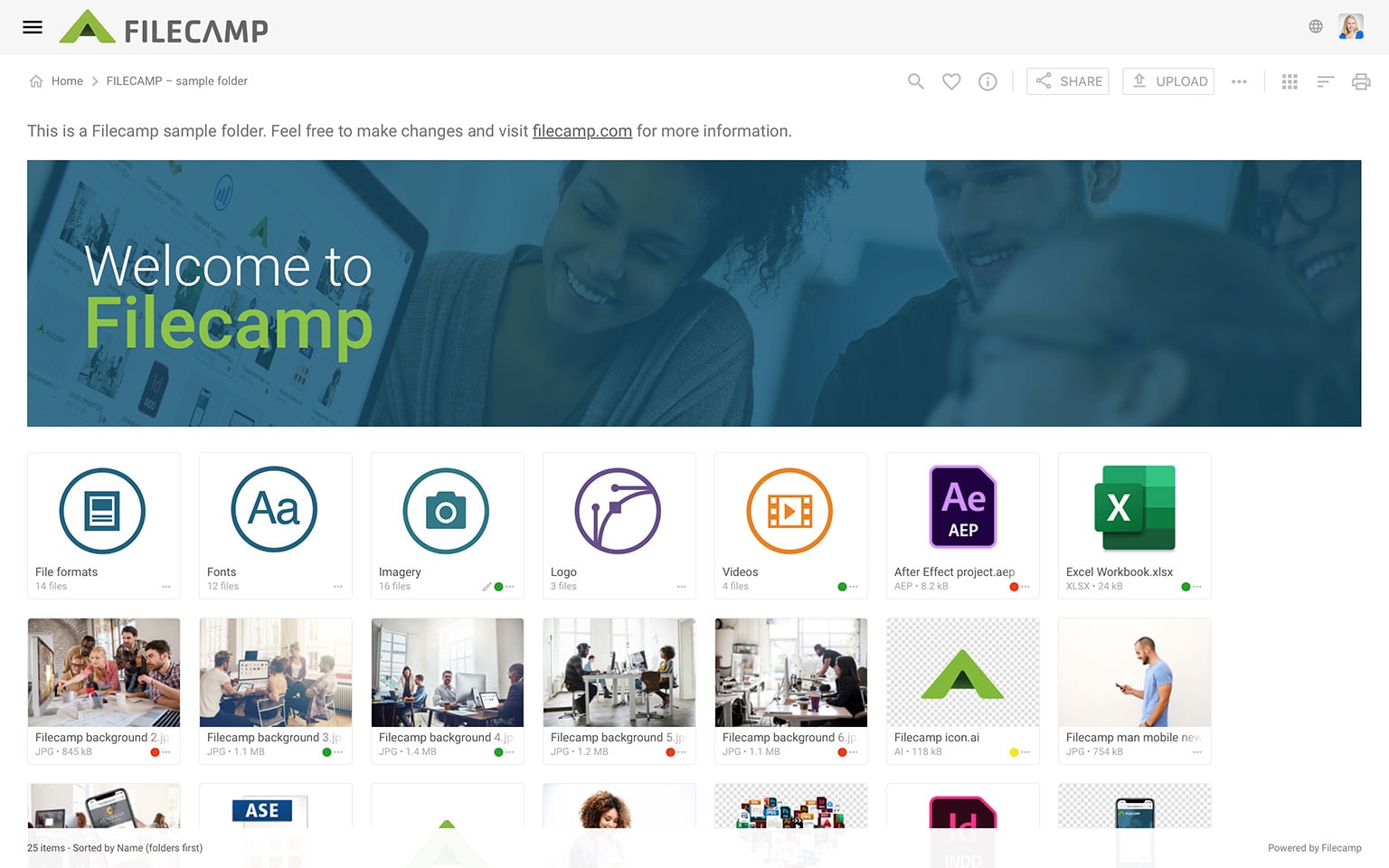
- We're excited to introduce Banners! Now, you can personalize your Filecamp folders with custom, polished banners.
Read more.
Bug Fixes
- We’ve fixed an issue where notification settings were not being saved properly. Unfortunately, this means some users will need to redo their notification settings. We’re sorry for the inconvenience!
- We’ve fixed a bug that affected uploading folders containing sub-folders.
March 8, 2025
What's new
- We've added more sorting options, and you can now click the column headers in List View to sort your files (ascending or descending).
Bug Fixes
- We've improved search performance and speed, especially for users accessing many different folders.
- "Select All" (ctrl/cmd) + a) now selects every file in a folder (whether it's 5 or 5,000)
- Fixed an issue that sometimes added MP4 videos to the video encoding queue.
- After previewing a file from the Files section or from search results, you'll now return to the correct scroll position.
- Fixed a problem where some collections showed the wrong file count.
- Fixed issue when navigating to folders from search results.
- Fixed a bug that could cause your header to appear on embedded sites, even with the /?hidetop=true parameter in the src attribute.
March 1, 2025
What's new
- We optimized our databases to ensure better performance and future-proof scalability.
- Updated the UI in the Shares section to provide a clearer overview of your shared links.
Bug Fixes
- Resolved an issue where “Filecamp” would appear in the browser title upon refresh.
- Improved handling of name conflicts when uploading new versions.
- Corrected a bug causing the Sort and Layout fields in the Infobar for the root folder to appear blank.
- Fixed a problem that could disable the Advanced options in the Edit folder menu.
February 22, 2025
Bug Fixes
- Fixed a problem with flickering favicons from other themes.
- The Large list option in Search is now visible on all sites.
- Grid, Large Grid, Large list options are now working in the edit collection info bar.
- "Notify me on new access requests" is working again.
- Custom domains can now be deleted.
- Fixed a floating label styling issue in the Domain section.
- Uploads are now continuing also if you navigate to other folders while in an upload process.
- Fixed so that we can show small logos closer to the right sizes in the themes section.
February 8, 2025
What's new
- We’ve enhanced our platform to improve search and filtering, now allowing you to use Boolean operators (AND, NOT, OR) and wildcard characters (*, ?) to refine your search results. Read more.
- We have introduced two new view settings; Large Grid and Large List – which provide bigger thumbnails and a better overview of your files. Read more.
- When you copy a folder, all custom thumbnails and other folder settings from its sub-folders will now also be copied.
Bug Fixes
- Email addresses entered in the share modals are now confirmed with the Tab key or by simply clicking outside the field.
- Logos wider than 500 px will now fit better in the header.
- We have improved the upload process, so you can navigate to other folders while it’s in progress.
- Fixed a conflict between browsing through files (previous/next) and using various sort options.
- Fixed several video encoding queue issues, especially with MP4 and MOV files.
- Pages now open more smoothly.
- Fixed a conflict with Office Viewer and our bottom navigation bar.
- Fixed problems with text in PDF forms and various text layers.
December 21, 2024
What's new
- We’ve enhanced our platform to handle very large ZIP archive downloads, ensuring a smoother and more reliable experience.
Bug Fixes
- Added direct file links for PSD files.
- Fixed "preview" direct file links for TIF and PSD files.
- Introduced a user search feature in the Bulk Permissions Update modal.
- Removed an unnecessary horizontal scrollbar in download modals on Windows 11.
- Corrected image ratios for SVG (vector) file types.
- Resolved an issue causing some header logos to appear squeezed on small mobile devices.
December 11, 2024
Bug Fixes
- Fixed an issue where some regular users were unable to change labels on files, despite having the correct permissions.
December 10, 2024
Bug Fixes
- Reintroduced paging in the copy/move modal (temporary solution until a better one is implemented).
- Restored the ability to paste tags into the "Edit Multiple Files" modal.
- Fixed an issue where details were missing in the Infobar for shared collection links.
- Enhanced user search functionality for accounts with over 1,000 users.
- Improved support for SVG files used as header logos in the Themes section.
December 7, 2024
Bug Fixes
- Fixed a bug that prevented viewing files from shared Collections.
- Pages selected from the main menu are now displayed on full screen again.
- You can again choose from more than 250 users when approving access requests and inviting users.
- Fixed a bug that caused issues when unzipping files with special characters on Windows.
What's new
- We have introduced a "Large list" view option on the search results page.
September 1, 2024
What's new
- We’ve significantly improved the quality and speed of thumbnail generation for NEF and other RAW image formats.
November 23, 2024
We’re excited to announce a major update packed with new features, enhanced usability, and performance improvements to make your Filecamp experience even better!
What's new
- Multilingual Support: Filecamp is now available in multiple languages.
- Enhanced Search: Enjoy auto-suggested search results across all Filecamp sections.
- Updated "Request Files" UI: A refreshed interface for "Request Files" links.
- Improved Toast Messages: Toast messages now feature clickable links for better usability.
- Infinite Scrolling: Content now loads automatically as you scroll – no more 250-item page limits.
- Enhanced Commenting Interface: A streamlined experience for leaving and managing comments.
- Drag-and-Drop Upload Indicator: A clear drop zone now highlights where you can drag files and folders.
- Multi-Select Made Easy: New “drag to select” feature for easier multi-selection of files and folders.
- Enhanced Tagging: Paste multiple comma-separated tags directly into the tags field and copy tags between images.
- Improved PDF Previews: Now includes text copying from PDFs.
- Faster File Previews: Experience smoother, quicker previews.
- Share Modal Updates: The “Request Files” share modal now includes a “Notify me of uploads to this folder” option.
- Folder Sizes: Folder sizes are now visible in the Infobar.
- Add to Collection and delete from fileview: Files can now be added to Collections and deleted directly from the large preview view.
- New Keyboard Shortcuts: Numerous shortcuts have been added for faster navigation.
- Enhanced Search on Shared Links: "Search below folder only" now works on shared links.
- And Many More Improvements. Including hundreds of additional enhancements to streamline your workflow!
July 28, 2024
What's new
- Thumbnails are now generated automatically for videos.
- All user, admin, and folder permissions are now included in the CSV file when you download your users' list.
Bug Fixes
- Improved support for emojis in file and folder names 🥳
- Fixed a bug with wildcard* searches.
-
March 24, 2024
Bug Fixes
- We have addressed an issue preventing tags from being embedded in large PNG files.
- Locked users should no longer be able to add favorites. Issue resolved.
- The Home folder (Files) was previously omitted from the Log entries but has now been included again.
- Previously, a manual refresh was required after deleting a Collection to update the list.
- We resolved an issue where the Bulk auto tags option in the edit multiple files modal sometimes failed to function.
- We have resolved an issue where users with multiple access points and delete permissions could inadvertently delete their root folders.
- The General setting "Do not encode media files (saves storage space)" now works again on all instances.
- Copy user - required a refresh to test login as. Fixed.
-
December 27, 2023
What's new
- You can now easily create links to other sites with the new Add Link feature.
Bug Fixes
-
Admins can now delete other user's profile pictures (avatars).
September 18, 2023
Bug Fixes
- We have fixed the annoying "share link bug" we introduced with our update on September 2nd.
- The link to calculate folder size from List View now says "calculate" again (instead of 0 B).
- We have made further improvements so that plan and storage upgrades are propagated faster.
September 2, 2023
What's new
- We are now saving the last used shared link type in the user's browser cache.
Bug Fixes
- Local time instead of UTC is now shown again in all places where we show time/dates.
- Plan and storage upgrades are now propagated immediately again.
August 27, 2023
Bug Fixes
- Empty (0 KB) files will no longer be considered in the upload process.
- The "UPLOAD" button is now grayed out and disabled during an ongoing upload process to prevent accidental clicks.
- Fixed an issue where new signups and storage upgrades could experience a 24-hour delay before their storage changes were completely distributed.
August 24, 2023
Bug Fixes
- We have addressed a problem where image previews and thumbnails were not being created for certain image types that were uploaded to Filecamp within the last 24 hours. Regrettably, you will need to re-upload these images if you wish for the image previews and thumbnails to be generated. We apologize for any inconvenience this may have caused!
August 19, 2023
Bug Fixes
- Enhanced storage calculation scripts, to address issues that could cause long loading time/delays, particularly for larger accounts with substantial storage usage.
- Optimized our metadata import methods, resulting in faster processing of tag imports and other embedded metadata.
July 28, 2023
What's new
- Incorporated multiple security headers to ensure our performance remains at an A-level in various security assessment tests.
Bug Fixes
- Resolved an issue related to "​" occurrences when copying usernames from other platforms into Filecamp.
July 24, 2023
Bug Fixes
- We have resolved an issue that was causing the Share folder option from the Bulk Action Bar to not work properly.
July 15, 2023
Bug Fixes
- We have successfully resolved an issue that had the potential to affect the functionality of Commenting and Label changes when accessed through shared links.
July 8, 2023
Bug Fixes
- In order to resolve login difficulties experienced by certain Firefox browsers, we have made alterations to the Cookie Behavior on our login page, specifically addressing the "SameSite Cookie Behavior" error.
June 25, 2023
Bug Fixes
- Fixed an issue where the Share folder links triggered via the Bulk action bar didn't always work.
May 20, 2023
Bug Fixes
- Markers are now working again ... also for PDF files.
- Fixed an issue where the expiration icons would not show, on expired items.
May 7, 2023
What's new
- You can now preview Microsoft Word, PowerPoint, and Excel files directly from your Filecamp 🔥
Bug Fixes
- We've fixed the glitch impacting the zoom function on images.
April 29, 2023
What's new
- You can now use the ESC key to close the large preview view 🎉
- You can now see how much storage can be released by emptying your Trash.
- You can now browse through all files in a (+250 files) folder.
- Support for WebP images as custom thumbnails, avatars, and theme images.
Bug Fixes
- Column headers in list view are now clickable (for sorting) in all views.
- Fixed a few strange issues that could occur with specific metadata import/export sessions.
- Refined the new automated weekly database optimation script for better search results.
- You will now only see the relevant options from files in large preview in the Trash.
- Removed the (not working) comments option in the dropdown menu for shared Collections.
- Fixed several problems with longer label texts.
- "View & Download" is now the default link type both when sharing a Collections.
- You will not be allowed to upload SVG files as your header logo, as this file type is not supported by most email clients.
- Fixed a problem where you could add more files in the upload window, but nothing happened.
April 22, 2023
What's new
- Administrators with unpaid invoices will now see a payment reminder popup.
Bug Fixes
- Faster previews of RAW image files (no image dimensions delay).
- Automated weekly database optimation for better full-text search results.
- Shared links on shared pages now work again.
- Fixed metadata import issue when keywords (from Photoshop) were just one keyword (a string) and not as expected a series of strings (an array).
April 15, 2023
Bug fixes
- Logged-in users can now also download from a shared "search result link".
- The transparent background indicator is now back in your Themes section.
March 30, 2023
Bug fixes
- Fixed an issue where an "/i" in a folder's unique id (URL) could cause problems various issues.
- You can now download files from a shared search result link.
- Added support between the search function and different versions of the Spanish/Catalan character (à/à).
- We have made it easier to see that the folder permission icon is a click menu.
- Arrow keys should not browse between images when the share modal is open.
Notice: This update was rolled out on some of our EU-based servers on March 26. All servers across all regions were updated on March 30.
February 11, 2023
Bug fixes
- More color-accurate thumbnails and previews for NEF (RAW) image files.
- All new trial accounts will have the General Setting "Auto tag all images after upload" enabled as default.
February 5, 2023
Bug fixes
- Files in Collections are now auto-updated when a new version of a file has been uploaded.
- Fixed a problem with some videos from iPhones (portrait in 720p) getting squeezed.
- We have fixed an issue where Auto tags could replace the "manually entered" Tags when a file was copied.
- Adjusted our server cache timeout settings so that shared links to files are now instantly updated when a new version has been uploaded.
January 28, 2023
What's new
- For improved PDF previews we have upgraded PDF.js to the newest version (v3.2.146). PDF. js is the open-source JavaScript PDF viewer that renders PDFs in Filecamp using web standards-compliant HTML5.
January 21, 2023
What's new
- View only share links. You can now also share files, folders, and Collections as view-only so the recipients won't be able to download the file.
- Simplified URL scheme. You can now give your clients access via a more simple URL (eg. https://files.yourcompany.com/clientname instead of https://files.yourcompany.com/fo/clientname).
- URL security update. For an extra level of security, we are now locking the link type to the shared link. Unfortunately, this means that existing Request file links (upload links) have to be updated. This can easily be done from your Admin > Shares section where you can search for the share ID in the URL eg. "D7QpjEiSIeIcPE2E" or Vanity ID, choose the desired link type, close the popup window, and then the old link will work again. Or contact us and we'll be happy to help.
Bug Fixes
- We have fixed a bug where clicking the Control/cmd key click could mess up other processes.
- You can now comment on files using the Three Dots Menu (•••) on shared folder links.
- Folder permission (Yes/No) on the users' list is now getting updated instantly (you do not have to refresh).
- You can now edit a user from the dropdown menu on the user list.
- We have removed a timeout setting so that very large PNG files now also can be downloaded in various lowres versions.
Notice: This update was rolled out on some of our EU-based servers on January 7. All servers has been updated on January 14.
November 26, 2022
What's new
- You can now have multiple images auto-tagged and /or have all your images tagged automatically after upload using artificial intelligence (Pro plan only). Read more.
- We have implemented a more natural sort order so that numbers in files and folder names are now sorted as 1, 2, 3 ... 9, 10, 11, etc.
- The search results will now stay in the selected view even if you preview an image or if you toggle between multiple pages with search results.
- You can now download your entire user list as a CSV file, in case you want to send emails to them outside Filecamp. Read more.
- You can now search for your Administrators by typing "admin" or "administrator" in your user list search field. Read more.
- You can now use various levels of transparency in the logo bar background color. Read more.
Bug Fixes
- Bulk permissions updates are now registered in the Log.
- We have removed the 60px whitespace from the "?hidetop=true" command when embedding folders. Read more.
- Pages will be assigned to the "No theme" when a theme is deleted.
- Access Request - "Disable Notifications" setting is now also copied from the "template" user when doing Bulk permissions updates.
- We have improved the HTML email templates so that emails from your Filecamp should look better in older Outlook applications.
November 20, 2022
What's new
- You can now download your entire log, or just the current log search results, as a .CSV file. Read more
Bug Fixes
- We have solved a problem that on rare occasions would show the wrong file name and thumbnail just after you have replaced a file with the same filename.
November 13, 2022
Bug Fixes
- We have fixed an issue where the vanity folder URLs folder sometimes didn't show the correct theme on the login page.
September 26, 2022
What's new
- You can now open any shared link just by clicking on the Open in new window
 icon from all share Pop-up windows.
Bug Fixes
- Users that haven't logged in are now marked with a "No login" in the Admin > Users section. Note: Works only for users created after today (September 25, 2022).
- You'll now get an error message when trying to do impossible tasks via the Bulk Action Bar.
- Search for files and folders with a specific Label below a specific folder works again.
- When you try to Log in as a user with no folder permissions you will now get an error message.
- Fixed an issue where unnecessary page toggles could show up in the folder access window when a user has "Manage users" permission, but not root access.
- Fixed an issue where unnecessary page toggles could show up in the folder access window for folders containing +250 files.
- Insert image from a folder on a Page now works again.
August 21, 2022
What's new
- You can now view the login page directly from the edit Theme section. Read more.
Bug Fixes
- Fixed a bug that could prevent uploading avatars.
- We have solved a problem that sometimes would show the wrong theme on share file link (download mode) pages.
- Solved an issue that sometimes would show the same Labelset multiple times in the Advanced search dropdown menu.
August 14, 2022
Bug Fixes
- We have improved thumbnails/previews of especially Adobe Illustrator .eps files.
JuLY 24, 2022
What's new
- We have made some general UI/UX improvements (fixed Toolbar etc.) to make it easier to select multiple items and perform bulk actions.
- The Search function has been moved into the Toolbar and the most used actions like "Download" and "Share" are now buttons instead of just icons.
Bug Fixes
- A lot of minor refinements and bug fixes.
June 8, 2022
What's new
- We have re-introduced a much better version of the beloved breadcrumb menu 🥰
- When entering your username and password from the login page you can just click the return key to proceed.
- You can now embed any Filecamp folder or Collection on any website via iFrame. Read more.
Bug Fixes
- Better UI support for long file names and folder names especially on mobile.
- The "Disable notifications" setting is now compatible with the "Bulk permissions" update options.
June 4, 2022
What's new
- You can now disable Notifications for specific users if you don't want them to be able to set up Notifications themselves. Read more.
Bug Fixes
- We fixed an issue that, in certain circumstances, prioritized the file "Caption-Abstract" metadata instead of file "Description" metadata.
- It is now more clear that you cannot click on the column headers on the Search results page to change the sort order.
- A "Close search" function has been added to the Search results page.
May 19, 2022
Bug Fixes
- Fixed a Let's Encrypt certificate renewal problem.
- You can now only send 5 emails per day from Filecamp in the trial period. This is to prevent misuse from malicious hackers 😎
- Fixed a problem that made it possible for Basic and Advanced plan customers to add comments on files. Commenting is only available in the Professional plan.
May 8, 2022
Bug Fixes
- Email invites are now working again on all server instances.
- Fixed a strange issue that prevented the multiple-size download option to show on some image files.
- Fixed a compatibility problem with some older browsers.
- Search results are now sorted correctly (by name).
May 1, 2022
What's new
- You can now drag and drop files directly from your desktop into any folder in Filecamp. See how it works.
- Added support for HEIC files and transparent SVG files.
- Download RAW images in various lowres versions.
- You can paste multiple email addresses into the share modal window.
- We have improved how Messages are shown.
Bug Fixes
- Better previews and thumbnails of CMYK images without ICC color profiles.
- Admin users can no longer send bulk invites to themselves and thereby block their own access.
- Download arrows are now added to files in Collections.
- Users with Trash access but no root access can now empty the Trash.
- To simplify things you cannot change Labels and add Comments on files in Collections anymore. It was too complicated and difficult to understand for many users because the permission to change labels and add comments is set on folders, and not Collections.
- Locked users and users without a valid email address as their username are now getting an error message when trying to reset their password.
- The timestamps in the Log and in the Messages are now aligned.
- You will now get a warning when you try to upload +8MB images as custom thumbnails.
- Locked users can not mark folders as favorites.
- Review Access Requests – you can now copy permissions from all users (also if you have +250 users).
- Negative (white) vector files with transparency are now also showing the transparency in the Infobar.
- We have set a limit so the Log now stores the latest 20,000 entries.
- Fixed a timeout issue that sometimes prevented the multiple-size download option to show on large image files.
APRIL 24, 2022
What's new
- Major backend update where we have updated all our libraries (Debian, GoLang, Nginx, ImageMagick, PDFjs, etc.) to the newest versions. This is to improve overall performance and future-proofness.
MARCH 27, 2022
What's new
- We have updated SSL certificates on all servers.
MARCH 13, 2022
Bug Fixes
- For users with access to multiple folders with different themes, we'll now show the Theme from the first access folder, instead of the Default Theme.
- We have fixed a bug that sometimes cropped the preview when zooming in on PNG images with specific image dimensions.
February 27, 2022
What's new
- When deleting a user, the shared file/folder links the user has created will remain active and can be managed from the Admin > Shares section.
- You can now see the file name/folder name for items you have shared in your Log.
Bug Fixes
- Some expired and deleted share pages gave a blank screen instead of the correct error page.
January 29, 2022
What's new
- We've implemented HSTS with NGINX for added security for all customers.
Bug fixes
- Page toggles are now working on mobile view again.
- Fixed a bug that could allow view-only users to be able to download.
- Fixed an issue where it looked like admins could change their root folder, but changes were not saved.
December 4, 2021
Bug fixes
- You can now again change labels on folders from the Infobar.
- We've added better support for different kinds of quotation marks in Search queries.
November 6, 2021
What's new
- We've added a small Download tooltip on all download icons.
Bug fixes
- Fixed a problem that could cause the search for tags to fail.
- Fixed download files from the listview glitch.
- Save page button is now back on all Pages.
- Fixed a problem with uploading new user avatars.
October 30, 2021
What's new
- Page update. You can now assign Pages to folders and have them pop up when someone enters a folder. Cool little feature if you ask us 😃 Read more.
October 9, 2021
What's new
- Countless minor UI/UX refinements and bug fixes.
October 2, 2021
What's new
We have released a major UI/UX update. This update is an overhaul of the user interface and is supposed to make many things more intuitive.
Some of the changes are:
- We have listened to the feedback we have received since our update in January 2021, and the Sidebar is now not always visible but can be opened by clicking on the Info
 button.
 - The breadcrumb is now a dropdown menu that ensures better support for complex folder structures.
- Bulk file actions are now located in connection with the Select files option.
- All icons have been updated to Google Materials icons.
Notice: Our Knowledge Base does not yet fully reflect the changes in this update, but all support pages will be updated within a few days.
June 27, 2021
Bug Fixes
- Apostrophes (and most other special characters) in Tags are now embedded correctly.
- Logo clicks now work from the search results page.
- Links in invite and password reset emails now link to the user's home (root) folder.
- Only the Theme ID is now stored in the user's local storage. This is to avoid issues with theme edits not being visible for the user making the edits.
June 20, 2021
What's new
- Log in to your home folder. We thought it was smart that users were logged into the folder they logged out from. We were wrong, and this has caused some confusion from users that couldn't comprehend why they sometimes were logged into an "arbitrary" subfolder. We have therefore changed the procedure so that users are always logged into their home folder (unless you access it through a direct link to a file or folder).
Bug Fixes
- You can now again change folder permissions from the folder permission pop-up window.
- Closing a page takes you now back to the folder you came from.
- Custom thumbnails are now also visible on the search results page.
- Multiple files can be removed from Collections.
- Log in page with centered logo can no longer be scrolled to the left.
- Administrators can now be invited even if they have no folder permissions.
- Fixed a minor styling issue in the main menu, so that the storage warnings are now always fixed to the bottom.
- Files with filenames containing an apostrophe ( ' ) can now be removed from Collections (thanks for your patience, Chris).
May 1, 2021
What's new
- Improved Log Search. You can now use double quotes ("") to find phrases or words containing dots (.) or hyphens (-) e.g. "blue-sky.jpg".
Bug Fixes
- You will no longer be able to send an invite to a user if the user is Locked or has no folder permissions.
- To prevent Administrators from being locked out of their accounts, they will now get a warning when trying to remove their Administrator rights.
- Fixed a minor problem with png files containing only one tag.
March 14, 2021
What's new
- We have updated our integration to Letsencrypt so that custom domain changes should be propagated faster.
Bug Fixes
- Logo click now works for all users. Click on the logo in the header to navigate to the theme root folder.
- Renaming files improvement. You will now receive an error message when trying to rename a file if there is already another file in the same folder with the same name.
March 1, 2021
What's new
Change of Billing solution - We have switched over to using Stripe as our preferred payment and invoicing platform. Stripe is built for SaaS businesses like Filecamp and will give us a more streamlined, futureproof, and secure payment solution.
Notice: Some of our old (and most loyal) customers were still paying the prices we introduced when we launched Filecamp back in 2010. Starting from March 1, 2021, all customers will be paying the prices we have been listing on our pricing page since 2018. We hope that you will appreciate the extended time you had on the reduced rates, and hope for your understanding.
To simplify things we have also stopped support for 6 months invoicing and for billing in other currencies. All customers are now paying in USD, either monthly (by Credit Card) or yearly (by Credit Card, bank transfer, or PayPal).
We will continue to make improvements to our billing section over the next 1-2 weeks.
February 13, 2021
What's new
- Click on the header logo from the Admin section will now open your Files (root) folder.
Bug Fixes
- Users with download permission can now again download files directly from the search results list.
- Better support for various types of apostrophes in folder names.
- Fixed a problem that could cause problems when removing tags from mp4 files.
- You can now open comments by clicking on the comments icon in the sidebar, also from the folder view.
February 7, 2021
Bug Fixes
- Various UI improvements for mobile.
- Upload from mobile works again.
- The "No Label" label is now hidden from all files and folders if Label change is not allowed on the folder.
- Apostrophes in folder names could cause metadata not to be correctly embedded into the files.
- Upload of background image in Admin > Themes could fail when the color selector was clicked just before.
- An error page is now shown to users trying to access from an outdated browser e.g. IE11.
January 30, 2021
Major User Interface update - We have listened to the feedback we received since our last large update two years ago. We have now made it easier and more intuitive to select items and perform bulk actions. We hope you will like it (when you have got used to it).
What's new
- You can now bulk select files using the Select all option or by using keyboard shortcuts. This means that you have to double click to open files and folders, (like on any mac/pc) or click on the file / folder name in the gallery view.
- The Sidebar is visible all the time making it easier for new users to find the file/folder information.
- Commenting and Notifications settings have been moved from the top navigation bar to the Sidebar.
You can see a quick overview of the interface changes here.
This update hasn't any new features and the things you have done before are still doable. But this UI update was an important step so that we can continue refining Filecamp and developing new cool features.
All accounts have been updated and we will continue to refine the User Interface over the next weeks.
We promise that it will all be good, so please have a little patience 🙏
September 26, 2020
What's new
- Search results - when you enter a file from the search results, you will now be directed back to the search results when you click the close button. Navigate to the parent folder from the breadcrumb on the search results list.
- Storage changes are now propagated faster.
Bug Fixes
- We fixed a bug that sometimes squeezed the preview when you zoomed in on large images.
- Slashes (/) in file and folder names are now replaced with hyphens (-).
- Remember folder view setting - when you eg. select List view and opens a file in large preview, you will still be in list view when you return to the folder.
- Remember the scroll position - when you preview a file and close the large preview window you will still be on the same scroll position when you return to the folder.
September 20, 2020
Bug Fixes
- Empty trash script updated - fixed a bug that sometimes caused the empty trash script to timeout before it finished.
- Calculate folder size script updated - fixed a bug that caused the calculate folder size to timeout on complex folder structures.
- The download arrows are now back on shared folder pages.
- Improved caching system - we are now adding versions numbers to our source code files to avoid browser cache issues when we release updates.
September 18, 2020
What's new
- User interface overhaul - we have cleaned up all code to improve overall performance.
- Toggle between your files in fullscreen view using the left and right arrow keys.
- You can now no longer change or delete the file extensions from files by accident.
- Improved overall mobile/responsive experience.
- Email "from name" - You can now change the "from name" on emails sent from Filecamp. Default is now your Filecamp subdomain (instead of the users email address) but you could enter e.g. your company name instead. This more user friendly but also helps to avoid problems with some anti-spoofing policies and spam filters. Read more
- The sender's email address is now again used as the reply-to email address to emails sent from Filecamp.
- We have changed the number of users per page from 250 to 100 in Admin > Users to make navigation between pages faster.
- We have disabled right-click to avoid the unauthorised download of preview images and thumbnails.
Bug Fixes
- More accurate colors on CMYK image previews.
- Quicker navigation between pages of users and all users are now listed in the search log and Bulk user actions.
- Improved auto-suggested keywords/tags.
- Quicker updated folder permissions/favorites settings when folders are moved to Trash.
- Users with permission to folders with different themes are now presented with the correct theme.
- The same number of characters in collection descriptions as to folder descriptions.
- We fixed a problem with our Storage Limit notifications emails, that caused the emails to be empty. So if your Administrators have received some empty emails from us, you might be close to your storage limit.
June 19, 2020
Bug Fixes
- We have fixed an issue where clicking on the logo in the header sometimes gave an Access forbidden error on Shared Folder links.
- It is now more intuitive how to save changes when you have edited tags in the Edit File menu.
June 14, 2020
What's new
- Download notifications - you can now choose to be notified either by email or in-app message when someone downloads a file from folders you have subscribed to. Read more.
- You can now toggle between files in your Search Results. Just double-click on a file and use the left/right arrow to toggle to the previous/next file in the search result. The Close button will bring you to the folder that contains the current file. Click the Browser Back button to get back to the search results.
Bug Fixes
- Email tracking has now been disabled on emails sent from our admin interface to your Administrators. We didn't use it and it made the links look strange.
- You can now use up to 64 characters as custom field labels on your Request Access forms. Read more.
- Our GeoIP legacy database has been updated to show you a more accurate location of your users in your Log.
June 7, 2020
What's new
- More options in the Bulk permissions update feature. You can now choose to update specific permissions only. Read more.
- The Admin > Shares section has been refined and you can now search for a specific share. Read more.
- When you click on the logo in the header you will be directed to your Home folder.
Bug Fixes
- Improved rendering of small vector images (sharper previews and better quality lowres versions). These new settings will apply for all new files uploaded to your Filecamp.
- Fixed a navigation issue that could happen when using vanity URLs on folders containing +250 files (pages).
- We have made it more difficult for Administrators to remove their own Administrator permission unintentionally.
- The used storage calculation has been made more accurate.
May 24, 2020
What's new
- You can now search for shared links in Admin > Shares. Read more.
- To improve overall performance we have set a 200 MB / 100 megapixels limit on file preview. Read more.
May 17, 2020
What's new
- We have made it possible for you to add a few custom fields on your Request Access form so that you can get more information about the people that are requesting access to your Filecamp. Read more.
Bug Fixes
- We corrected a bug that sometimes showed a blank page instead of the correct 404 page on expired shared links.
March 22, 2020
Bug Fixes
- Favorites are now deleted instantly when the favorite folder is deleted (and Trash emptied).
- We updated low-res downloads so that these versions are only generated if the original image is larger than 600px.
- We have made the storage calculation script more accurately.
- Your storage usage is now updated instantly after you have emptied the Trash.
- We corrected a Safari browser-specific/date selector bug.
- We have fixed an issue that could cause failed previews on versions of multiple page pdf files.
February 15, 2020
What's new
- We have made it easier to add several tags/keywords to a file (the enter tag menu stays active after each tag has been saved).
- New file types icons - we have updated our file icons to better reflect the 2020 Adobe and Microsoft file formats.
- "Never expire" is now set as the default value for all shared links.
Bug Fixes
- Better support for the use of underscores (_) in folder vanity URLs and search queries.
- Fixed a Gallery view styling issue in the Safari MacOs browser.
February 1, 2020
What's new
- We have released a Access Requests feature (Pro plan only) so new users can request access directly on the login page. And your admins can easily either Reject or Approve these Access Requests. Read more.
- Redesigned the Notifications window with more informative descriptions and dropdowns instead of radio buttons.
Bug Fixes
- Fixed issues with PDF page previews and renderings that sometimes could mirror a page when you zoomed in to quickly on a page.
- Warning when saving comments containing more than 512 characters.
- Fixed a problem with some unsubscribe links in notifications.
January 19, 2020
What's new
- The procedure for User Invite emails has been modified. Before both the username and password were included in the email. This was conflicting with some companies' antivirus/anti-spoofing policies. Now the email only contains a link where the recipient can enter their preferred username and login directly.
January 12, 2020
What's new
- We have developed an in-app Net Promoter Score (NPS) survey. We hope to get some good feedback here that can help us improve and refine Filecamp in future updates. We have tried to make this as non-intrusive as possible and the survey is only presented to Filecamp Administrators.
Bug Fixes
- All source code is now hosted on our servers instead of having tiny bits hosted on google.com and other services that might be blocked by eg. The Great Firewall Of China.
- The large preview zoom/toggle bar is only shown if there are more files in a folder/collection and/or it is possible to zoom in and out on the file.
November 30, 2019
What's new
- Replace option when uploading file and folders with the same file names as the ones that already exists in the location. Read more.
- Custom thumbnails are now retina/HD ready, and the optimal image size is 336 x 240 px. Read more.
- The shared Vanity URL name is now visible on the Admin > Shares list.
Bug Fixes
- Fixed a problem with the expiry date selection in specific Safari browsers.
- You can now navigate through older log entries using pages in the log.
- Auto-tags is now working again in all browsers.
- More descriptive log entries when editing files vs folders.
- WebDAV setting updates are registered in the log.
October 26, 2019
What's new
- Improved large preview interface with more zoom-, full-screen-, and print options.
- Overall performance is improved when browsing through folders and files.
- The info and comment window remains open until you close it, making it easier for you to edit/comment on multiple files.
- Improved search and sorting of search results by relevance.
- Confirmation is now required before files and folders are moved to the Trash.
- Reply-to-email address on notifications changed to a "do-not-reply" email address to avoid conflict with anti-spoofing policies and spam filters.
Bug Fixes
- Fixed a styling issue with the close comment checkbox.
- Tags/keywords with +7 digit numbers are now supported.
October 26, 2019
What's new
- Improved large preview interface with more zoom-, full-screen-, and print options.
- Overall performance is improved when browsing through folders and files.
- The info and comment window remains open until you close it, making it easier for you to edit/comment on multiple files.
- Improved search and sorting of search results by relevance.
- Confirmation is now required before files and folders are moved to the Trash.
- Reply-to-email address on notifications changed to a "do-not-reply" email address to avoid conflict with anti-spoofing policies and spam filters.
Bug Fixes
- Fixed a styling issue with the close comment checkbox.
- Tags/keywords with +7 digit numbers are now supported.
October 17, 2019
What’s New
- When copying a folder, all folder settings are now copied over to the new folder. This will make it easier for you to make a "template" folder with the desired settings. Read more.
- The text from the text input fields in the file info window can now be copied, also by users that cannot edit them. Read more.
- Share Direct file links are now assigned to the Share files & folder user permission. Read more.
Bug Fixes
- Log in as works now with the Stay signed in option. Read more.
- When copying the Log as a CSV file (as multiple pages), no duplicate entries will occur.
- When copying a file to the folder you are currently viewing, the folder should refresh automatically.
- Metadata from images uploaded via WebDAV are now extracted automatically by an hourly script.
- The folder view is now automatically refreshed when you turn cover thumbnails on and off in the folder setting. Read more.
- We've added a tooltip over the close comment checkbox to make it more clear what happens when you check this box.
- More accurate and up-to-date Geolocator settings in the Log so that you can see more precisely where your users are located.
- You will now get a warning if you try to use the Log in as feature to log in as another administrator. Read more.
- Expired links remain in your account for 30 days in Admin > Shares, so you can change the expiry date to reactivate an expired link.
OCtober 6, 2019
What’s New
- Vanity URLs on all shared links. Replace the encrypted text in all shared links with a text of your own choice. Read more.
Bug Fixes
- Better support for extremely large files (+3GB) upload.
- Spaces in usernames are now allowed.
- Improved the thumbnail (preview) procedure for complicated files.
- Quicker thumbnails (previews) of large (in pixel-count) files.
JULY 30, 2019
What’s New
- Vanity URLs on folders. Replace the secure and encrypted default folder name with a text of your own choice. Read more.
- You can now search for a log entry in the Log even if the specific log entry is collapsed. Read more.
- More clear limit on how many characters (max 3500) you can enter in share messages.
- All Administrators will receive an email notification when your account reaches 80%, 90%, and 100% of your storage limit.
Bug Fixes
- Prevention for creating a folder name that starts with a dot, which causes problems for certain OS.
- Auto tags work again in all regions.
- Fixed a bug that could prevent custom domains changes to be successfully propagated to AWS Route 53 DNS service.
July 23, 2019
What’s New
- Log in as another user. Admins can now log in as another user. Great for testing purposes and for helping set up notifications for other users. Read more.
- Your last used expiry date on shared links is saved in the browser cache, so you don’t have to remember to set the expiry date when sharing files and folders.
Bug Fixes
- Fixed a bug between that (in some cases) changed the expiry date on shared links to 1 week, even if you have selected e.g. Link never expires.
- We have now added a warning if you try to delete the file extension for a file.
- Support for longer messages (3500 characters) in share messages.
- Share pages now work again.
- Improved the Receive files without login (public upload) feature.
- Improved preview of CMYK images with embedded ICC profiles.
- Fixed a bug that caused people to receive upload notifications even if the upload was canceled.
JULY 10, 2019
What’s New
- Contact sheet feature. You can now easily print an overview of all files in a folder or Collection.
- Faster previews when browsing through images in large preview mode.
- Bug Fixes
- Improved previews of certain .svg files.
- Problem with a specific Chinese character in folder names and missing thumbnails
- Shared links are now deactivated/removed right after they have been deleted.
- Double quotes in folder names could prevent thumbnails in being generated.
april 12, 2019
What’s New
- Added support for pages on the user list for customers with +250 users.
- Go to folder feature directly from the corresponding log entry.
- An intelligent (AI) thumbnail generating priority system.
- External users can now also self-register to change labels (approve) files.
- You can now upload .webloc and .url files that link to other sites.
Bug Fixes
- Removed the option for Locked users to create Collections and Favorites.
- Pdf files should not be shown with cover thumbnails
FeBRUARY 20, 2019
Whew! The new Filecamp is here. We have been working on this update for the last 2 years. And we are looking very much forward to show you all the new features and refinements!
What’s New
- New 100% responsive user interface
- Better performance
- More storage space
- Folder upload
- Easier user management
- Advanced search features
- Improved proofing/commenting tools
- More notification options
- More custom branding
- Bulk adding of tags
- More metadata options
- Auto-tags
- Bulk add and invite users
- Custom pages
- ... and a lot more.
Related articles

Tim Deasy, Creative Director / Founder, Standard Official™